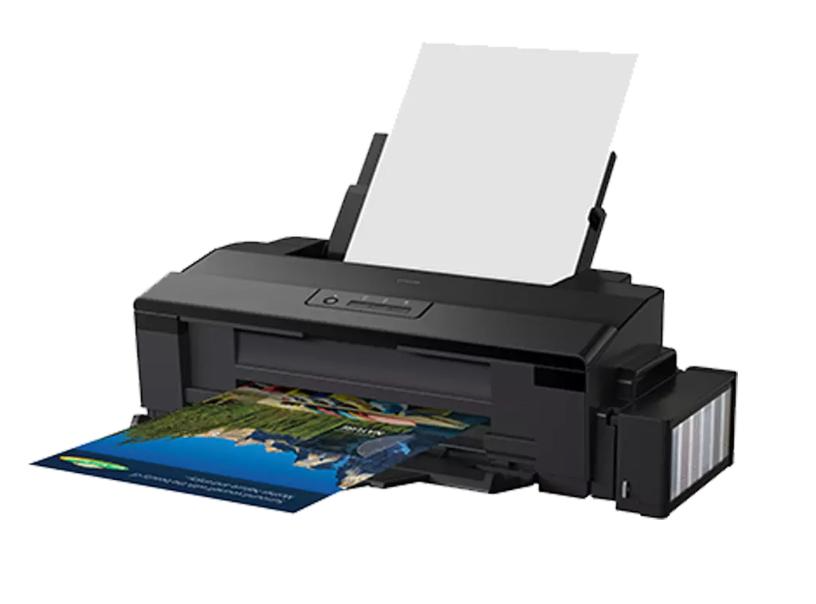
Epson L1800 DTF Printer Review: Real-World Experience, Common Problems, and Maintenance Tips
Choosing the right printer is one of the most important decisions when starting a Direct-to-Film (DTF) printing business. A printer that produces good results but requires constant maintenance can quickly become frustrating, especially for small business owners who depend on daily production.
The Epson L1800 is one of the inkjet printers commonly converted for DTF printing. Its A3+ printing capability makes it an interesting option for people who want to produce custom T-shirt designs, merchandise, and personalized apparel.
However, using a converted Epson L1800 for DTF printing is not always straightforward. White ink maintenance, nozzle performance, and proper printer care are important factors that every owner should understand.
In this article, I’ll share practical observations from using an Epson L1800 DTF setup, including its advantages, common problems, and maintenance considerations.
1. What Is the Epson L1800 DTF Printer?
The Epson L1800 is originally an A3+ inkjet photo printer. It is not manufactured as a dedicated DTF printer, but some users convert it for Direct-to-Film printing.
DTF printing is a process that transfers printed designs onto fabric using special PET film, DTF ink, adhesive powder, and a heat press.
A typical converted Epson L1800 setup uses:
- CMYK inks for color printing.
- White ink for the backing layer.
- PET transfer film.
- DTF adhesive powder.
- A heat press machine.
- RIP software for managing print layers and white ink.
One important thing to understand is that the performance of a converted printer depends on more than the printer itself. Ink quality, conversion components, software settings, and maintenance routines can all influence the final results.
2. My Epson L1800 DTF Printing Setup
My setup uses an Epson L1800 converted for DTF printing, together with AcroRIP software.
I mainly use the printer to produce designs for custom T-shirts and merchandise.
The printer is generally operated during working hours, approximately from 6:00 AM to 3:00 PM.
Here are some important parts of the setup:
| Component | Setup |
|---|---|
| Printer | Epson L1800 |
| Printing method | Converted DTF |
| Software | AcroRIP |
| Ink system | CMYK + White |
| Transfer material | DTF PET film |
| Main application | Custom T-shirt printing |
This setup is suitable for discussing the practical challenges of running a converted DTF printer, particularly when the printer is used regularly for small-business production.
3. Print Performance and Daily Usage
One of the important things to monitor when using a converted Epson L1800 is nozzle performance.
In my experience, CMYK ink and white ink can behave differently during daily operation.
White ink requires particular attention because it contains white pigment that can settle when left unused. This makes proper ink circulation and maintenance especially important.
When the printer is working normally, the goal is to maintain consistent printing without unnecessary interruptions.
For a small printing business, even a minor printing problem can affect production schedules and customer orders.
That’s why I recommend checking the printer’s condition before starting a production session rather than waiting until a visible printing problem appears.
4. Common Epson L1800 DTF Problems
Although the Epson L1800 can be used for DTF printing, it also comes with some challenges.
Here are the problems I have encountered or consider important to monitor.
White Ink Clogging After Leaving the Printer Overnight
One of the recurring issues in my setup is white ink clogging after the printer has been left unused overnight.
The CMYK channels may remain in good condition while the white ink channel develops nozzle problems.
This can be frustrating because white ink is an essential part of DTF printing, especially when producing designs for dark-colored fabrics.
Some maintenance practices worth considering include:
- Following the ink manufacturer’s recommended handling instructions.
- Keeping the printer in a suitable environment.
- Checking the white ink system regularly.
- Performing nozzle checks before production.
- Avoiding unnecessary long periods without appropriate maintenance.
White ink maintenance should be treated as part of the daily printing workflow, not as an occasional task.
Black Ink Nozzle Problems
Another issue I have encountered is black ink nozzle clogging.
Although my initial problems were more noticeable with white ink, black ink nozzle issues also appeared later.
This is a reminder that every ink channel needs attention.
If a nozzle check shows missing lines, identify the affected channel before deciding what maintenance procedure is necessary.
Frequent Head Cleaning
It can be tempting to run repeated head-cleaning cycles whenever print quality becomes inconsistent.
However, excessive cleaning is not always the best solution.
Head cleaning consumes ink and can increase waste, particularly when dealing with a converted DTF system.
A better approach is to:
- Perform a nozzle check.
- Identify which color channel has a problem.
- Inspect the ink supply system.
- Follow the appropriate maintenance procedure.
- Repeat the nozzle check to evaluate the result.
Avoid performing repeated cleaning cycles without understanding the underlying problem.
5. Epson L1800 DTF Printer Maintenance Tips
Proper maintenance can help reduce interruptions and keep a converted printer in better working condition.
Here are several practices worth incorporating into a regular workflow.
Check Nozzles Before Printing
A nozzle check helps identify missing lines or inconsistent ink output before starting a large print job.
This is particularly important for white ink because problems with the white layer can affect the final transfer.
Pay Attention to White Ink
White ink needs special attention in a DTF printing setup.
Follow the ink manufacturer’s instructions for circulation, storage, and handling. Do not assume that the white ink system will behave exactly like ordinary CMYK ink.
Inspect the Capping Station and Wiper
The capping station and wiper are important components of the printer’s maintenance system.
Ink residue and contamination can affect how well the printhead is maintained.
Inspect these components regularly and use cleaning materials that are compatible with your printer.
Avoid Unnecessary Cleaning Cycles
Before performing head cleaning, check the nozzle pattern and identify the affected channel.
This helps prevent unnecessary ink consumption and reduces repeated maintenance.
Keep a Maintenance Record
A simple maintenance log can help you identify recurring problems.
Record information such as:
- Date of nozzle checks.
- Which ink channels show missing lines.
- Head-cleaning activities.
- Long periods of printer inactivity.
- Changes in printing performance.
Over time, these records can help you understand your printer’s behavior and improve your maintenance routine.
6. Advantages and Disadvantages of Using the Epson L1800 for DTF
Before choosing the Epson L1800 for a DTF business, it is important to understand both its potential benefits and limitations.
Advantages
- A3+ printing capability.
- Can be converted for DTF applications.
- Suitable for custom apparel and merchandise projects.
- Can be used with RIP software such as AcroRIP.
- An option for small-scale production setups.
Disadvantages
- Requires conversion before DTF use.
- White ink needs careful maintenance.
- Nozzle clogging can interrupt production.
- Requires regular inspection and cleaning.
- Results depend heavily on the conversion and ink system.
The biggest consideration is not simply the purchase price. You should also consider maintenance costs, production interruptions, and the time required to keep the printer running.
7. Is the Epson L1800 Worth Using for a DTF Business?
The Epson L1800 can be an option for people interested in building a small DTF printing operation.
However, it is important to understand that the L1800 is a converted inkjet printer, not a purpose-built industrial DTF machine.
For beginners, the relatively accessible conversion ecosystem may make it interesting. But users should be prepared to learn about ink behavior, nozzle maintenance, RIP software, and transfer processes.
If your business depends on consistent daily production, you should compare the long-term maintenance requirements with those of dedicated DTF printers before making a purchasing decision.
8. Frequently Asked Questions
Can the Epson L1800 be used for DTF printing?
Yes. The Epson L1800 is commonly converted for DTF printing using compatible ink systems, PET film, white ink, and RIP software.
Why does white ink clog more easily?
White DTF ink contains white pigment that can settle over time. Poor ink circulation, long periods of inactivity, and maintenance issues may contribute to clogging.
Can I leave my Epson L1800 unused overnight?
It depends on the condition of the printer and its ink system. White ink requires particular attention during periods of inactivity. Follow the manufacturer’s maintenance recommendations.
Is AcroRIP compatible with Epson L1800 DTF setups?
AcroRIP is used in some converted Epson L1800 DTF workflows. Compatibility depends on the printer configuration, software version, and system setup.
Should I perform head cleaning every day?
Not necessarily. Perform nozzle checks and use appropriate maintenance procedures when needed. Repeated cleaning without checking the nozzle condition can waste ink.
Is the Epson L1800 suitable for beginners?
It can be an option for beginners who are comfortable learning printer conversion and maintenance. However, someone looking for a simple plug-and-play DTF solution may prefer a dedicated DTF machine.
Final Thoughts
The Epson L1800 can be an interesting platform for small-scale DTF printing, but it requires attention and regular maintenance.
From my experience, white ink management is one of the most important aspects of operating this type of converted printer. Problems can also affect other ink channels, so regular nozzle checks and careful troubleshooting should become part of the daily workflow.
If you are considering using an Epson L1800 for your T-shirt business, do not focus only on the initial purchase price. Think about ink consumption, maintenance, replacement parts, and production reliability as well.
A printer is only one part of a successful DTF business. Good maintenance practices and a consistent production process are just as important.
Have you used an Epson L1800 for DTF printing? Share your experience and the problems you have encountered in the comments.
Leave a Reply